
Description
Why Choose the Demo Import & Setup Service?
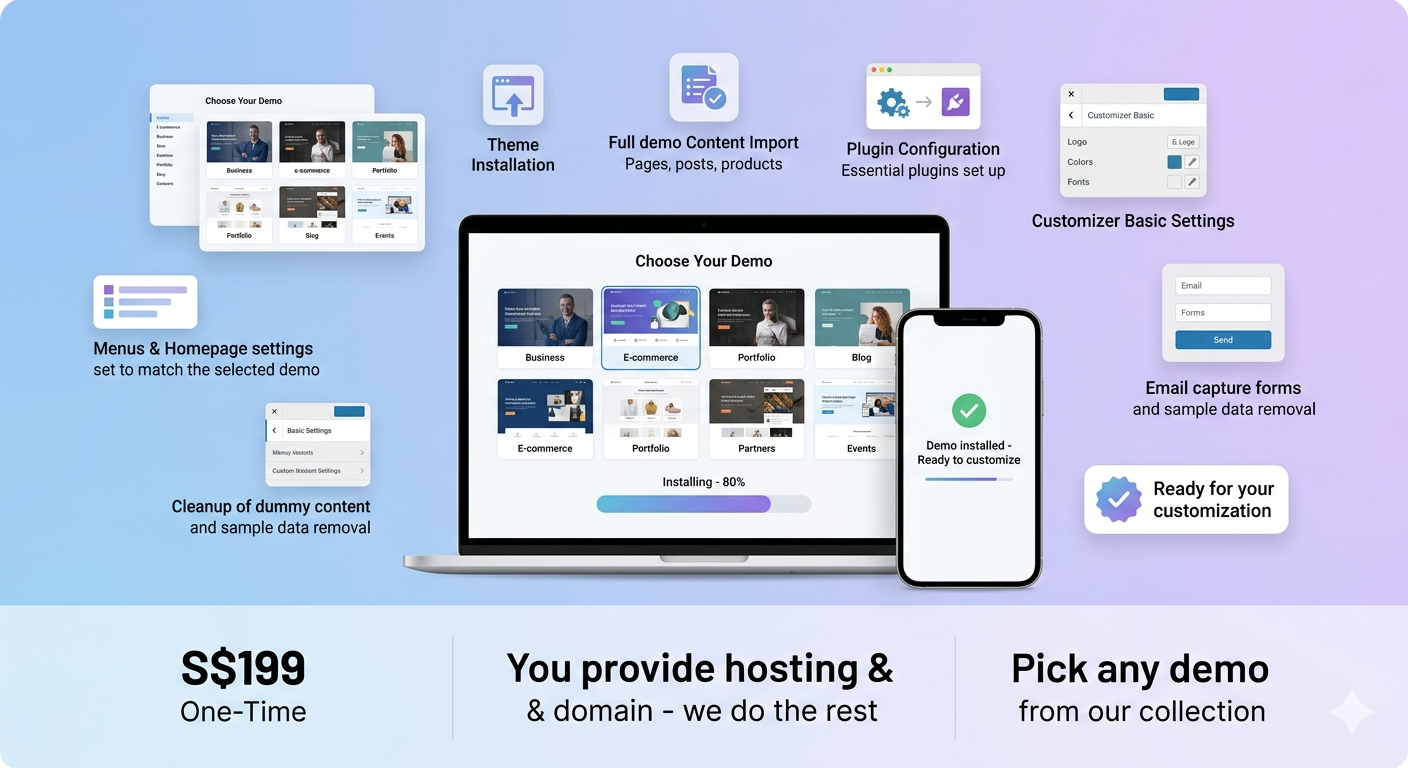
You love one of our demo designs, and you already have your own WordPress hosting and domain. But the thought of installing themes, importing demo content, and configuring plugins still feels like a hassle.
This service bridges the gap. You pick the demo style you want. We handle the technical setup. You get a clean, working website ready for your content — in just a few days.
How It Works
| Step | What Happens |
|---|---|
| 1. You Pick a Demo | Browse our demo sites and choose the style you want |
| 2. You Purchase | Buy this service and tell us which demo you selected |
| 3. You Provide Access | Give us temporary admin access to your WordPress site |
| 4. We Set Up | We install the theme, import the demo, and configure all plugins |
| 5. You Take Over | Your site is ready — add your content and launch |
What We Set Up for You
| What We Do | Details |
|---|---|
| Theme Installation | Install and activate the theme matching your chosen demo |
| Demo Content Import | Import all demo pages, posts, menus, widgets, and settings |
| Plugin Installation | Install and activate all required and recommended plugins |
| Basic Configuration | Set up the homepage, menu structure, and site title/tagline |
| Mobile Check | Verify the site displays correctly on mobile and tablet |
| Handover Notes | Brief notes on what was done and how to start customizing |
What You Need to Provide
| Required | Details |
|---|---|
| Domain & Hosting | Your WordPress site must be installed and accessible |
| Admin Access | Temporary WordPress admin login (see access options below) |
| Demo Choice | Which demo style you want us to import |
| Site Title (Optional) | Your business name for the site title |
Two Access Options — You Choose
Option A: Standard WordPress Login
Provide your WordPress admin URL, username, and password.
After setup is complete, you can change the password or delete the account.
We recommend creating a temporary admin account for us and removing it afterward.
Option B: Temporary Login Without Password (Recommended)
Install the free plugin “Temporary Login Without Password” on your WordPress site.
Go to Users → Temporary Logins → Create New.
Enter our email address, set the role to Administrator, and choose an expiry date (5-7 days is ideal).
Copy the one-time login link and send it to us.
The link expires automatically — no password to share, no account to delete.
What’s Not Included
Domain registration or WordPress installation on your server
Content writing (page text is imported as demo placeholder content)
Custom design changes beyond the demo import
E-commerce product uploads (for store demos, sample products are imported only)
Ongoing maintenance or support beyond 14 days
Timeline
| Phase | Time |
|---|---|
| After purchase & access received | Setup begins within 1 business day |
| Setup completion | 1-2 business days |
| Review & adjustments | You review and request minor tweaks |
| Total | Typically 2-3 business days |
After Setup — What’s Next?
Once we hand over the site:
Your demo content is in place — replace it with your own text, images, and branding.
All plugins are installed and configured — no further technical setup needed.
You have full control — edit anything, add pages, and launch when ready.
14 days of post-setup email support included.
Frequently Asked Questions
Do I need to buy hosting and a domain first?
Yes. This service requires you to have a working WordPress installation on your own hosting. We don’t provide hosting or domain registration.
Can I choose any demo from your site?
Yes. Any demo style listed on our Demo Sites page is eligible for this service.
What if I don’t know how to install WordPress on my hosting?
Most hosting providers offer one-click WordPress installation. If you need help with this step, contact us — we can guide you or provide a separate installation service.
Can you also add my logo and change the colors?
This service covers demo import and plugin setup. For branding customization (logo, colors, fonts), consider our Done-For-You Website Service. Small tweaks may be included at our discretion.
What happens if something breaks during import?
We test every demo before offering it. If any issue occurs, we’ll fix it as part of the service.
Can I use the temporary login method?
Yes, and we recommend it. The “Temporary Login Without Password” plugin is free in the WordPress repository. It generates a one-time link that expires automatically — no password sharing needed.
Is my site ready to launch after this service?
Your site will be technically ready — all pages, menus, and plugins in place. You’ll need to replace the demo text and images with your own content before launching.
Reviews
There are no reviews yet.